Orientation
Check direction from the output-shaft face and keep command and feedback signs consistent.
A positive command turns the shaft one way; direction is read looking at the output-shaft face, not the rear cover.
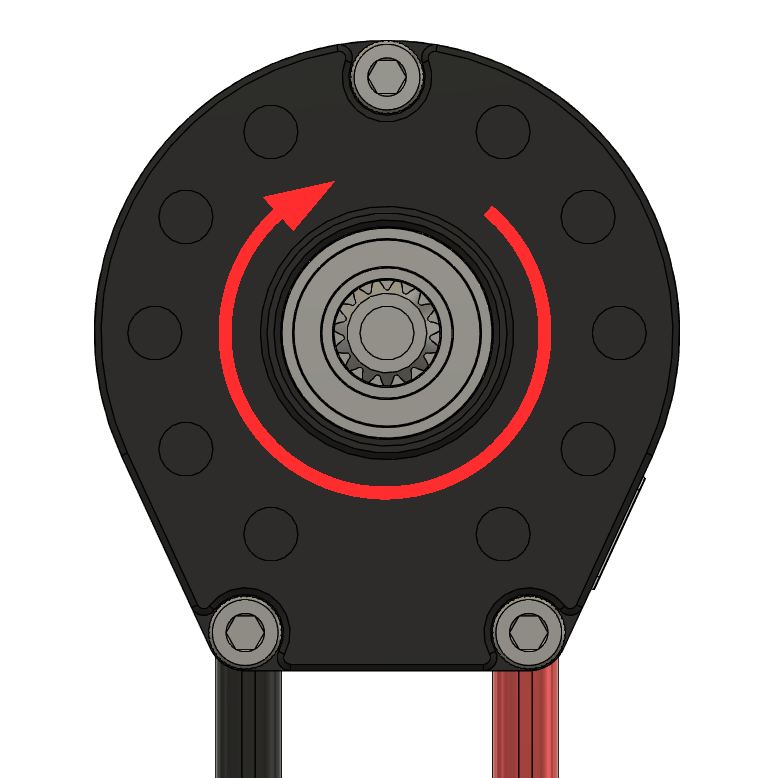
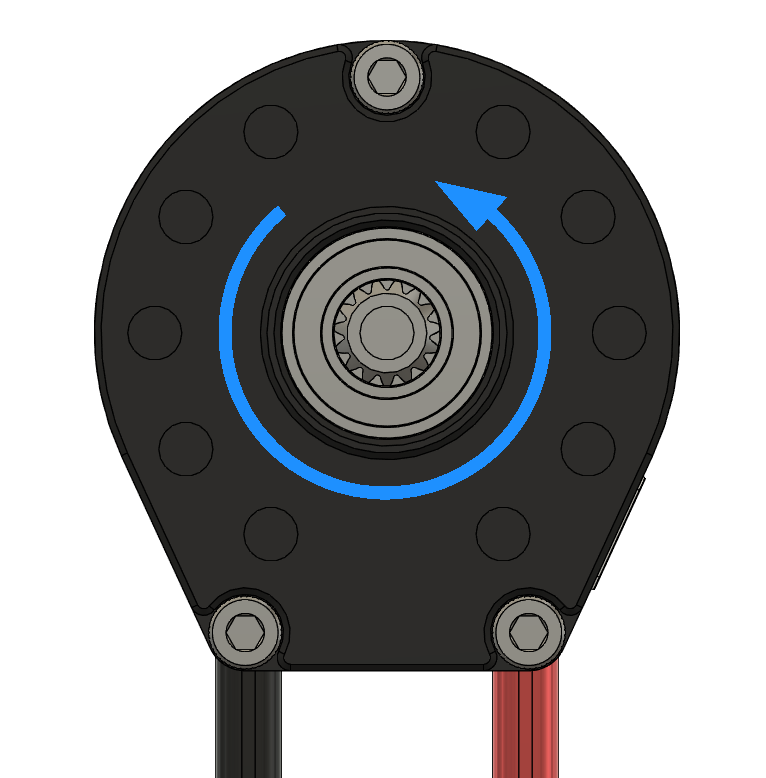
Checking direction
With the mechanism supported, send a small positive duty request and observe physical motion and the reported velocity sign. Disable before changing the setup. Do not change the encoder calibration to reverse a mechanism; that calibration is used to drive the motor correctly. The current Java MotorOutputConfigs class has no general Inverted field.
Pick one convention
Define positive motion for each mechanism, such as forward wheel motion or upward elevator travel. Apply the same sign convention to commands, feedback, and position targets. The motor counts complete turns while powered, but loses that count after a restart. Return the mechanism to a known position before using position targets based on that count.
Confirm the shipped direction on the motor and set it deliberately during setup rather than assuming it.
A consistent direction example
Suppose the motor turns five times for one output turn, and a negative motor command raises your arm. Define upward motion as positive in your robot code, use a ratio of 5, and use a direction multiplier of -1 for both requests and feedback. A positive quarter-turn request from home then adds -1 × 0.25 × 5 × 2π, or -2.5π rotor radians, to the recorded home angle. Use the opposite conversion to display the arm position.
This changes your program’s coordinate system, not the motor’s encoder calibration. Keep continuous wrapping off for mechanisms such as arms and elevators with limited travel.
Record a known home position
- Support the mechanism and move it to a repeatable reference while output is disabled, such as an alignment mark. A limit switch can establish a reference too, but automated homing must include a timeout, travel checks, and a response if the switch fails.
- With the mechanism stopped at that reference and position feedback arriving, record the current rotor angle in robot code as home. Do not run electrical encoder calibration to set the mechanism’s home.
- Convert later mechanism targets relative to that saved angle. Repeat the target from periodic code while enabled.
- Discard the reference after a detected restart, lost feedback, or an encoder fault, and establish it again. Restart detection alone cannot prove the reference is still valid.
The example below records a manually confirmed home and allows targets from 0 to a quarter mechanism turn. Adjust the ratio, direction, and allowed travel to your mechanism. Pass time in seconds from the WPILib FPGA clock; the position timestamp uses that same clock. Call recordHome() only after physically confirming the stopped mechanism is at home. This is not an automatic homing routine or a replacement for physical travel protection.
import com.swyftrobotics.cyclone.v4.SwyftCyclone;

public class ReferencedAxis {
    private final SwyftCyclone motor;
    private double home = Double.NaN;
    private static final double RATIO = 5.0;
    private static final double DIRECTION = -1.0;

    public ReferencedAxis(SwyftCyclone motor) { this.motor = motor; }

    private boolean fresh(double nowSeconds) {
        double stamp = motor.getLatest().motionTimestampSec;
        return Double.isFinite(nowSeconds) && stamp > 0
            && nowSeconds >= stamp && nowSeconds - stamp < 0.1
            && Double.isFinite(motor.getPositionRad());
    }

    public void invalidateHome() {
        home = Double.NaN;
        motor.disable();
    }

    public void recordHome(double nowSeconds) {
        invalidateHome();
        if (!fresh(nowSeconds) || motor.hasHardFault()) return;
        home = motor.getPositionRad();
        motor.clearRebootFlag();
    }

    // Call each enabled periodic cycle, after configuring position gains.
    public void moveToTurns(double turns, double nowSeconds) {
        if (!Double.isFinite(home) || !fresh(nowSeconds)
                || motor.hasLikelyRebooted() || motor.hasHardFault()) {
            invalidateHome();
            return;
        }
        if (!Double.isFinite(turns) || turns < 0 || turns > 0.25) {
            motor.disable();
            return;
        }
        motor.setPosition(home + DIRECTION * turns * RATIO * 2 * Math.PI);
    }
}
For position feedback in mechanism turns, use DIRECTION × (rotorRadians - home) / (RATIO × 2π). The example’s target-range check only checks requested positions; it does not detect every mechanical failure. Call invalidateHome() when your robot program detects a condition that makes the reference unreliable.